
个人习惯在windows上申请证书,因为直接点击我写的申请脚本就可以了,一句命令行都不用输,非常方便。之前用bat脚本写的并不是很好用,现在用powershell来重构一下,顺便增添些新功能。顺带一提,powershell的脚本文件后缀名是“.ps1”。想要运行外部powershell脚本需要先修改本地的安全策略,默认是禁止运行的。
证书申请流程
一般来说我们都会选择申请“主域+通配符子域”的形式,拿我这个博客示例,就是申请“cctv.moe + *.cctv.moe”。这种方式只能用DNS验证域名所有权,就是在主域上添加TXT记录,然后certbot验证这条DNS记录,通过了就给你发证书。

有时候我们不是完全持有某个域名,比如从某宝买的“二级不死”域名,一般来说是企业备案,可以自由挑选阿里、腾讯等备案方,针对我这种懒得自己备案的人来说,这也是一个非常不错的方式。我买的只需要50块钱一年,这成本真的非常低了。

但是这些商家提供的DNS解析服务就有亿些鸡肋了,比如我买的就限制所有DNS记录只能有一条,但有时候certbot要求添加两条TXT记录。这时候就只能选择HTTP方式验证域名所有权了,就是将域名解析到自己的服务器,然后certbot访问网址,服务器返回指定字符串,这样就能验证通过了。当然这种验证方式不能申请通配符证书,门槛也有些高,之后我也许会出Nginx配置HTTP验证的教程。
证书申请脚本
回到正题,现在贴出我的powershell证书申请脚本。首先安装certbot(点击跳转Github下载页)。脚本上面的变量需要你自己更改,代码复制到记事本之后保存编码一定要选择“UTF-8 BOM”,然后把文件后缀名从.txt改成.ps1:
#手动设置要申请证书的域名数组
[String[]]$hostInputArr = @(
    "cctv.moe",
    "cheap.pp.ua"
)

#手动设置certbot的exe目录
[String]$certbotPath = "C:\Program Files\Certbot\bin\certbot.exe"

#手动设置是否要申请通配符子域(1:不申请、2:申请)
[int]$pathDepth = 2

#手动设置域名验证方式(1:HTTP、2:DNS)
[int]$verifyMethod = 2

@'
#############################################################################
#                              Power By FLAAC3                              #
#/ᐠ。ꞈ。ᐟ\                    https://blog.cctv.moe                    /ᐠ。ꞈ。ᐟ\#
#                         https://github.com/FLAAC3                         #
#############################################################################
'@ | Write-Host

#脚本全路径
[String]$scriptPath = $MyInvocation.MyCommand.Path

class MyHost {
    [System.Collections.Generic.List[string]]$hostList
    MyHost ([string]$hostStr) {
        $this.hostList = [System.Collections.Generic.List[string]]::new()
        foreach ($i in 1..$script:pathDepth) {
            $this.hostList.Add($hostStr)
            $hostStr = "*." + $hostStr
        }
    }
    [string]ToString() {
        return [string]::Join("、", $this.hostList)
        }
    [System.Collections.Generic.List[string]]GetCertbotCmd () {
        $commandList = [System.Collections.Generic.List[string]]::new()
        $commandList.AddRange([string[]]@(
            "certonly",
            "--manual",
            "--agree-tos",
            "--preferred-challenges"
        ))
        if ($script:verifyMethod -eq 1) {
            $commandList.Add("http")
        } else {
            $commandList.Add("dns")
        }
        foreach ($hostStr in $this.hostList) {
            $commandList.Add("-d")
            $commandList.Add($hostStr)
        }
        return $commandList
    }
}

#检查是否用管理员权限打开
function Test-IsAdmin {
    return (net session 2>$null) -ne $null
}

#转换域名数组
function Get-Host-List {
    $hostList = [System.Collections.Generic.List[MyHost]]::new()
    foreach ($hostStr in $hostInputArr) {
        $hostList.Add([MyHost]::new($hostStr))
    }
    return $hostList
}

#选择域名
function Select-Host ([System.Collections.Generic.List[MyHost]]$hostList) {
    Write-Host "输入要申请SSL证书的域名编号:"
    for ($i = 1; $i -le $hostList.Count; $i++) {
        Write-Host $("{0}) " -f $i) -NoNewline -ForegroundColor green
        Write-Host $($hostList[$i - 1])
    }
    while ($true) {
        [int]$id = 0
        [int]::TryParse((Read-Host), [ref]$id) > $null
        if ($id -ge 1 -and $id -le $hostList.Count) {
            return $id - 1
        } else {
            Write-Host 输入有误!请重新输入! -ForegroundColor red
        }
    }
}

if (!$(Test-IsAdmin)) {
    Start-Process powershell -Verb runAs -ArgumentList @(
        "-NoProfile", #禁止加载所有PS配置文件
        "-ExecutionPolicy", "Bypass",
        "-file", $scriptPath
    )
    exit 0
}
$hostList = Get-Host-List
$index = Select-Host $hostList
while ($true) {
      & $certbotPath $hostList[$index].GetCertbotCmd()
    Write-Host `n脚本运行结束,按空格重新申请当前域名,按回车退出 -ForegroundColor green
    $key = [System.Console]::ReadKey($true)
    if ($key.Key -ne [System.ConsoleKey]::Spacebar) { break }
}
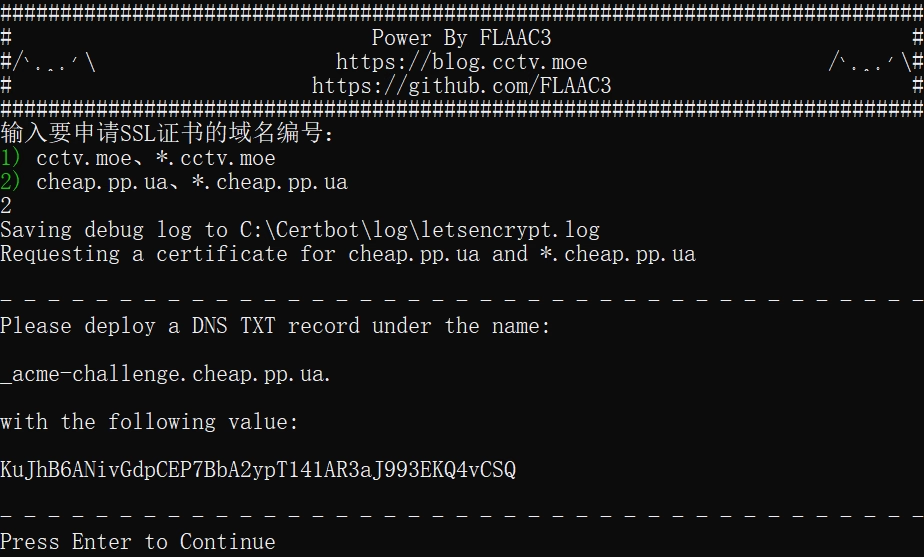
脚本运行截图:
各位如果觉得有用请点击下方的打赏,扫描二维码给我投币,创作不易,感谢支持!